
 By zynmag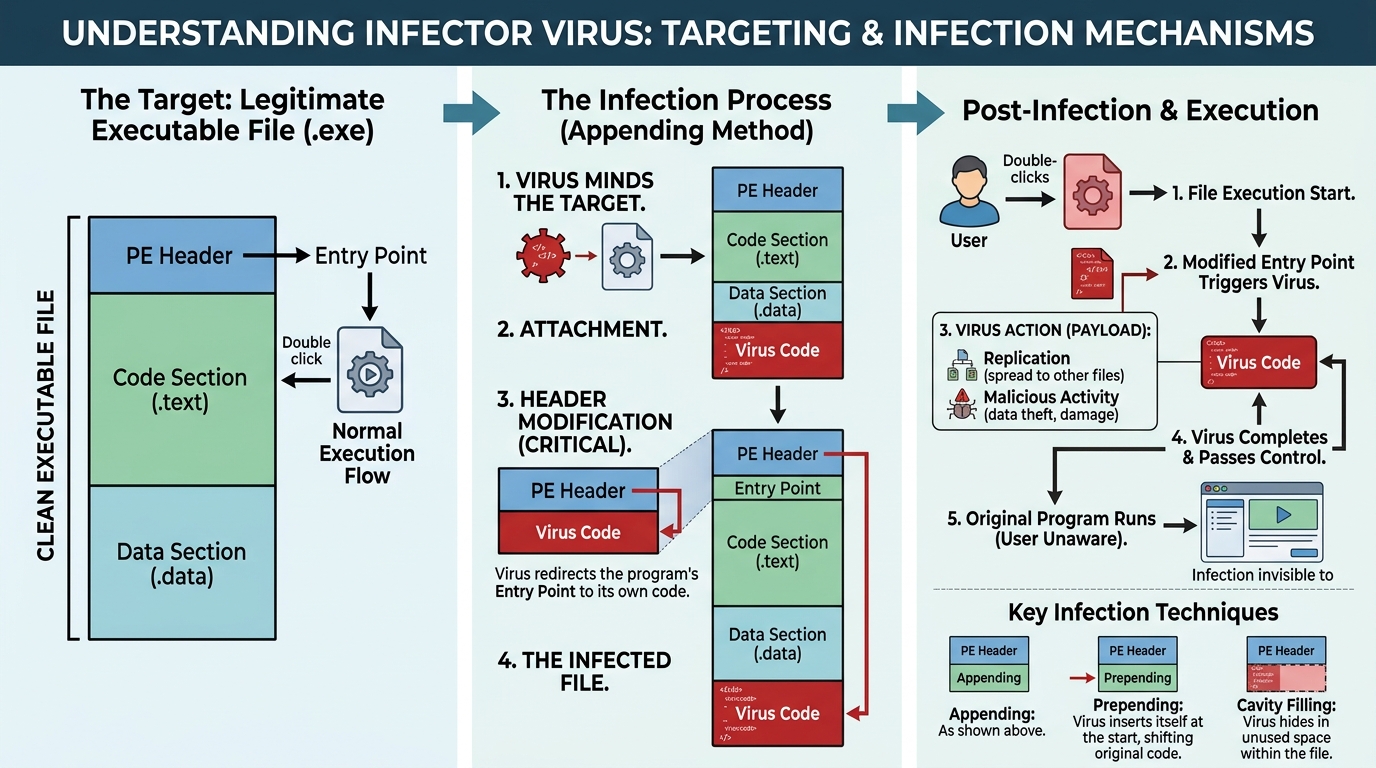
Infector viruses represent one of the oldest and most persistent threats in the world of computer security. These malicious programs attach themselves directly to executable files, waiting for an unsuspecting user to launch the infected program. Once activated, they spread quickly across systems and often corrupt or destroy data along the way. Understanding how these threats operate is essential for anyone who wants to protect their devices from lasting damage. In this article, we will explore what infector viruses are, how they function, and what steps you can take to defend against them.
What Are Infector Viruses
An infector virus is a type of malware that specifically targets executable files, such as those ending in .exe or .com. Unlike other forms of malware that hide within documents or exploit browser vulnerabilities, these viruses embed their code directly into legitimate program files. When a user runs the infected file, the virus code executes alongside the original program. This clever disguise allows the malware to remain undetected for extended periods. Because executable files are essential for running software, this type of infection can spread rapidly throughout an entire network.
The Core Mechanism Behind Infection
The fundamental process behind these threats involves inserting malicious code into a host file without noticeably altering its appearance or basic function. Consequently, the infected program often continues to work as expected, which delays detection significantly. Meanwhile, the virus silently searches for additional executable files to infect. As a result, one compromised system can quickly become a launching pad for widespread infection. This stealthy approach makes infector viruses particularly dangerous compared to more obvious forms of malware.
How Infector Viruses Spread Across Systems
Once an infector virus successfully compromises a single file, it begins searching the system for other suitable targets. Typically, it scans directories for additional executable files that share similar characteristics. Subsequently, the virus attaches copies of itself to each new file it finds, expanding its reach with every execution. Furthermore, many variants are designed to spread through removable media, shared network drives, or email attachments containing infected programs. Therefore, a single infected file downloaded from an untrustworthy source can lead to a cascading infection across multiple devices.
Common Infection Vectors
Cybercriminals rely on several delivery methods to distribute infector viruses to unsuspecting victims. Pirated software downloads remain one of the most common vectors, since users often skip security checks when acquiring cracked programs. Additionally, email attachments disguised as legitimate business documents continue to trick employees into launching infected files. USB drives and external storage devices also serve as effective transmission tools, especially in office environments where devices are frequently shared. Meanwhile, compromised websites sometimes bundle infected executables with seemingly harmless downloads, catching users off guard.
Types of Infector Viruses You Should Know
Several distinct categories of infector viruses exist, each employing a slightly different infection strategy. Direct action viruses activate immediately upon execution and then search for new files to infect before terminating. Conversely, resident viruses install themselves into system memory, allowing them to infect files continuously in the background. Meanwhile, polymorphic variants change their code structure with every new infection, making them exceptionally difficult for antivirus software to detect. Additionally, some infector viruses target specific file types exclusively, while others are designed to infect a broad range of executable formats.
Companion and Overwriting Variants
Companion viruses take a slightly different approach by creating a new file with a similar name to the original program. When the user attempts to launch the legitimate application, the system instead executes the malicious companion file first. Overwriting viruses, on the other hand, replace portions of the original file’s code with their own malicious instructions. Unfortunately, this method often renders the host program unusable, which can alert users to the infection sooner than other techniques might allow.
Why Executable Files Are Prime Targets
Executable files serve as the backbone of nearly every software application, making them an attractive target for malware developers. Because users trust and regularly run these files, attackers gain a reliable pathway for spreading their malicious code. Moreover, executable files often carry elevated system permissions, which allows infector viruses to make deeper changes to the operating system. As a result, infecting these files provides attackers with greater control over compromised machines. Consequently, cybersecurity experts consistently emphasize the importance of monitoring executable files for unusual behavior or unauthorized modifications.
The Role of File Permissions
System permissions play a critical role in determining how much damage an infector virus can inflict once it gains access. Programs running with administrative privileges can modify system files, install additional malware, or disable security software entirely. Therefore, limiting unnecessary administrative access across an organization significantly reduces the potential impact of an infection. Additionally, implementing the principle of least privilege ensures that most user accounts operate without excessive permissions, thereby containing potential damage from any single infected file.
Signs Your System May Be Infected
Recognizing the warning signs of an infector virus early can prevent significant damage to your files and network. Unexplained changes in file sizes often indicate that malicious code has been appended to a previously clean executable. Similarly, programs that suddenly crash, freeze, or behave unpredictably may be harboring hidden infections. Slower system performance, unexpected pop-up messages, and unfamiliar processes running in the background are additional red flags worth investigating. Furthermore, if your antivirus software repeatedly flags the same files despite removal attempts, this pattern strongly suggests a persistent infector virus at work.
Monitoring Tools and Techniques
Regular system scans using reputable antivirus software remain the most effective method for catching infector viruses before they cause serious harm. Additionally, file integrity monitoring tools can alert administrators whenever executable files are modified without authorization. Behavioral analysis software takes this a step further by identifying suspicious activity patterns rather than relying solely on known virus signatures. Consequently, combining multiple detection methods provides a more comprehensive defense against increasingly sophisticated infection techniques.
Effective Prevention Strategies
Preventing infector viruses requires a proactive, multi-layered approach to cybersecurity across every device and network. First and foremost, always download software exclusively from official and verified sources rather than third-party websites. Additionally, keeping your operating system and antivirus definitions updated ensures protection against the latest known threats. Meanwhile, disabling autorun features for external drives prevents many infector viruses from executing automatically upon connection. Furthermore, educating employees or family members about safe browsing habits significantly reduces the likelihood of accidental infection through social engineering tactics.
Building a Layered Defense System
No single security measure can completely eliminate the risk posed by infector viruses, which is why layered protection matters so much. Firewalls help block unauthorized network access, while antivirus software scans for known malicious signatures within files. Meanwhile, regular data backups ensure that even if an infection occurs, critical files remain recoverable without significant loss. Additionally, network segmentation limits how far an infection can spread if one device becomes compromised. Together, these layers create a resilient defense that addresses multiple potential attack vectors simultaneously.
What to Do If Your Files Get Infected
Discovering an infector virus on your system requires immediate and decisive action to limit further damage. First, disconnect the affected device from the network to prevent the infection from spreading to other connected systems. Next, run a full system scan using updated antivirus software to identify every compromised file accurately. Afterward, follow your antivirus program’s recommendations for quarantining or removing the infected files safely. In severe cases, restoring your system from a clean backup may be the most reliable path toward full recovery.
When Professional Help Becomes Necessary
Sometimes an infection proves too complex or widespread for standard antivirus tools to resolve completely on their own. In these situations, consulting a professional cybersecurity firm can provide specialized expertise for thorough remediation. These experts can conduct forensic analysis to determine exactly how the infection occurred and which systems were affected. Moreover, they can help implement stronger security protocols to prevent similar incidents from happening again in the future. Ultimately, investing in professional support often saves both time and resources compared to attempting complex removals independently.
Conclusion
Infector viruses remain a persistent and evolving threat within the broader landscape of cybersecurity risks facing individuals and organizations alike. By attaching themselves to executable files, these malicious programs exploit the trust users place in familiar software applications. However, understanding their infection methods, recognizing warning signs, and implementing layered prevention strategies can significantly reduce your vulnerability. Ultimately, staying informed and proactive remains the best defense against these silent yet destructive digital threats. As cyber threats continue evolving, maintaining vigilant security practices will protect your systems now and well into the future.